Friday, May 29, 2015

Extreme Cord Cutting for your Bachelor/Bachelorette Pad

  • George Takei explains Cord Cutting
  • How much you will save
  • What you will need
  • How to use it
  • Considerations
What is Cord Cutting? See George Takei's explanation below

I've been advocating cord cutting ever since 2007, and I am excited to see technology go in this direction (away from television providers).  I always push my friends and family to run "everything" on their phone but this is always received as super complicated and expensive, but it's the total opposite.  In this article, I take George Takei's explanation of cord-cutting and take it a step further, to save even more.   It is super easy and will save you money in the long run!

How much you will save

I have broken down the typical average cost for mobile, internet, and cable per month.  If you can see how that adds up in a year, you will be able to save on average, $865 a year!

Typical household billExtreme Cordcutting Bill
Mobile$90.00Mobile$106.00
Internet$46.00(1) Streaming Service$7.99
Television$50.00
Monthly$186.00Monthly$113.99
Per Year$2,232.00Per Year$1,367.88
Savings of$864.12

What you will need

1.  Use your Smartphone as your primary internet provider.  Get a T-Mobile Galaxy S4, S5, or S6 (or a LG G3 or G4) through T-Mobile.  The reason I suggest these phones is because they have the Screen Mirroring feature (we will talk about this later) and T-mobile offers an Unlimited Data plan (which means unlimited streaming) and a 5GB Mobile Hotspot data plan (which turns your phone into a router to allow your laptop or any internet connected device to run on).  A new Galaxy S6 with an $80/mo plan will run you about $106/mo.  If you have an old S4 you can increase your savings even more!

2.  Determine the type of mirroring you will do: Wireless or corded. This "extreme" cord cutting method cuts your home internet as well, so in order to do video streaming, you will need to choose a method to get your video onto your tv.  See the videos below:

Corded
vs Wireless 

You will need one of these, depending on your preferred mirroring method:
Corded (reliable):  Micro USB to HDMI Cable, Rankie 6.5 feet MHL Adapter Cable with integrated USB Charging Cable 
Wireless (convenient):  A Screen Mirroring Capable SmartTV or a Miracast Adapter:  Belkin Miracast Video Adapter (Supports HDMI 2.0)
More info on wireless screen mirroring (Miracast) here.

3.  Determine which streaming service suits you better.  General rule, if you prefer to watch movies, go with Netflix.  If you prefer to watch more current TV shows, go with Hulu.  To find out which streaming service has your favorite TV shows and movies,  www.canistream.it will tell you the availability of almost every video available online

How to use it

  1. To watch a video, enable screen mirroring on your phone and TV and open the video streaming service app on your phone to play it on your TV
  2. To use the internet on your laptop, enable hotspot on your phone and connect to your hotspot.

Considerations

This setup is ideal for a single-person household (maybe two, max) and in order for this setup to work, you will need to make sure:
  • You have a good T-Mobile signal at home.  Ask a friend with T-Mobile to come over to test their signal
  • You don't online game or download huge files on your computer.  5GB hotspot data is more than enough for most users, but if you're an online gamer or downloader, then this cord cutting method may not work for you.
  • You don't have a ton of internet connected devices.  If you have several internet connected devices at home that rely on a constant internet connection (i.e. IP Video Camera, server) then this will not work for you.
Although I have tried all the technologies discussed in this article, I have never made it my primary source because cable and internet is provided by my landlord.  But if you are seriously looking to reduce your monthly bills, this is definitely a way to do it!  Let me know what you think! 

Wednesday, January 22, 2014

Barnes & Noble NOOK Simple Touch 2GB BNRV300 - Best Buy

Barnes & Noble NOOK Simple Touch 2GB BNRV300 - Best Buy:


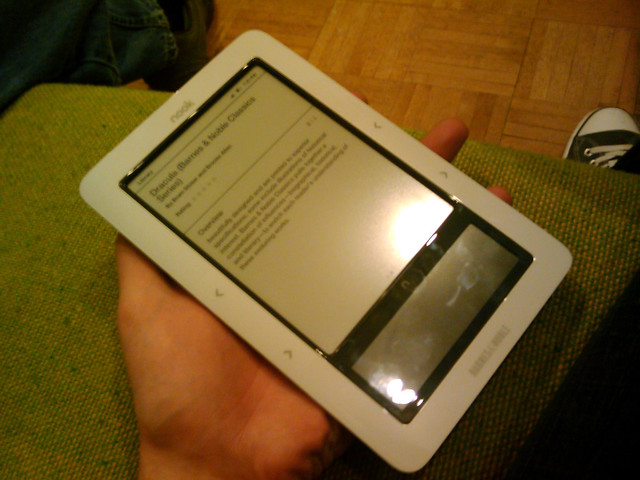
This is a great deal for TODAY ONLY!  For $37.99 you get a ereader that is hackable.  I work for an eye doctor and it is proven that all back-lit devices are eye-straining.  The NOOK Simple touch is non-backlit and therefore non-straining.  Perfect for periods of long reading.  Once rooted, it is an excellent tablet for the heavy reader.  Save your eyes, save your space, and save your money.  Get one!

'via Blog this'

Sunday, January 12, 2014

Not Another PDF Scanner 2 review: Free NAPS2 makes documents scans easier | PCWorld:
'via Blog this'

For those of you who have a crappy scanner/multifunction printer software- this is a great, simple, no frills scanner software replacement for making PDF files.  I use it in combination with my DocuCap AM481- Mobile, Duplex Scanner with ADF to archive simple PDF files (it's not a great scanner, but I got it dirt cheap). Will work with many TWAIN and WIA enabled scanners to archive documents.

Tuesday, December 31, 2013

Considering ditching your Cable/Satellite TV, Home Internet, and/or Bundles?

In 2008, I wrote this article: Alternative to buying DVDs, Blu-rays, & even Cable TV w/ HTPC and online streaming video .  With a lot of people I know ditching cable, I wanted to revisit this topic and review your many different options.  Five years ago, I expected that every home would have a computer attached to it and we would be using that to view all our content.  I never expected that mobile devices would be our primary device to the internet.  With all the advances in SmartTVs, DVRs, Rokus, etc - I think the best device you can buy at the moment is a Google's Chromecast which will unlock your mobile devices potential on the big screen.


Ditching your home internet provider
I've seen home internet bills from $34.99 to $52.99.  If you use a mobile device most of the time, then why spend that much when you can buy an 4G mobile enabled device and use the internet anywhere you go.  Combine it with a Chromecast and a Hulu Plus or Netflix account and you are set with your TV watching (see below).  The two carriers I recommend for your mobile use is T-Mobile and Verizon.

Who I recommend ditching home internet providers (only one of these requirements need to be met)
  1. Households of less than three
  2. Light internet usage (less than 2GB of data/mo)
  3. Majority internet usage on a mobile device (i.e. iPad, tablet, smartphone)
How much data do I need?
Karl Tate / TechNewsDaily - http://www.technewsdaily.com/4014-2-minute-expert-smartphone-data.html

T-Mobile 

  • I recommend this for your single household.
  • Less money down
  • Devices 
    • iPad Air 16GB 10.1" Tablet w/ 2.5GB of data ($56/mo) - link
    • Nexus 7 16GB 7" Tablet w/ 2.5GB of data ($46/mo) - link
    • Note III 32GB 5.5" Phone w/ Unlimited data ($99/mo) - link (I recommend this for Netflix, Hulu, & NBA League Pass users)
    • HP ENVY TouchSmart 14-k110nr Sleekbook  ($799 w/ 2 years free 200mb/mo) 

Verizon 

  • I recommend this if you are a current Verizon subscriber or if you need Verizon's excellent coverage area in your home.
  • This is perfect for a household of two with low data usage.  Verizon allows you to share your data plan so $30 4GB plan + $10 Tablet access + $10 Tablet access = $50 month for two lines.
  • I don't recommend Verizon if you plan on streaming a ton of videos from Netflix or Hulu on your mobile device.
  • Devices
    • iPad Air 16gb 10.1" w/ 4GB of data ($529 down + $40/mo) - link
    • Samsung Galaxy® Tab 2 8GB 10.1" w/ 4GB of data  ($249 down + $40/mo) - link

FreedomPop

  • I recommend this if you have light internet usage and an existing tablet or mobile device.
  • Devices
    • Freedom Spot Overdrive Pro (Refurbished) w/ 500mb of rollover data ($59.99 down + $7.98/mo) - link
    • Freedom Spot Overdrive Pro (Refurbished) w/ 2GB of data ($59.99 down + $19.99/mo) - link

Ditching your cable/satellite provider

I was amazed at how much my family members' were spending on their cable, internet, and mobile bills.  When I ask them why they pay so much, they usually say they need it to either 1) watch sports or 2) watch the Filipino channel.  I will try to show you some alternatives to save you guys some money.

Streaming Movies and TV

Five years later your two major providers for online content are still Netflix or Hulu Plus.  This is from my article 2008:
Netflix. Instead of paying $25 for the one new Blu-Ray, rent it instead for $8.99/mo... also allows you to stream movies directly to your computer. Advertising more than 40,000 movies to watch instantly, it has most of the movies in my DVD collection
Hulu. This is my alternative to TV DVD collections and DVRs. Fox, NBC, & USA have teamed up to provide web surfers the ultimate in streaming video...
in 2013:

OTA HDTV

Most network stations, ABC, NBC, CW, & CBS provide Over-The-Air (OTA) Content to your HDTV tuner for free.  All you need is an DTV antenna and you can pick up most of those channels.  Please check out this website to see what channels are available in your area: Antennaweb.org 

Antennae

 Depending on the type of antenna that you have, you can:

  1. Connect one antenna to each HDTV
  2. Get one powerful antenna (and an amplifier) and connect it to your existing cable tv wiring to use with all the tvs in your house.
  3. Use one antenna to stream to your home network and watch TV on any (2) computers or mobile devices using SiliconDust HDHomeRun HDHR3-US .  This will also turn any Windows Media Center or XBMC enabled PC into your own personal DVR.

Sports Channel Streaming Alternatives

Filipino Channel Streaming Alternatives


Tuesday, February 2, 2010

Every new computer needs...

***Update 2016.02.10 - just go to Ninite.com and select all the programs you want to install in one simple installation file ***

Haven't updated this thing in a while... But anyway- just a random delirious thought, as I'm deliriously fixing computers.

These are the programs I strongly recommend having on windows computer, unless of course you've paid money for the alternative. All these are free.

  • Google Pack (you'll need Chrome, Apps, & Picasa at the very least)
  • Firefox (don't get it from the google pack, it's usually a version or two behind)
  • Adobe Flash (make sure you uncheck the McAffee Security Scan plus)
  • Java (you need it for a lot of websites)
  • PDF Xviewer (quick,editable Adobe Reader alternative)
  • PDF Creator (when you don't have a printer available, print it to a pdf file!)
  • MyDefrag (great disk defragmenting utility)
  • VideoLan or K-Lite Codec Pack Standard (VideoLan can play most files w/o codecs, or choose K-Lite to keep your default movie player)
  • AVG Antivirus (a low profile, all-around, and free antivirus/spyware solution)
  • What about Microsoft Office? Use Google Docs instead.